Taj Mahal GO Locker theme1.01
Publisher Description
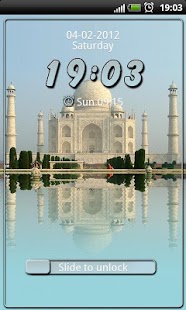
A beautiful Taj Mahal theme designed by modo lab, perfect fit with ours Taj Mahal GO SMS Pro theme.
Taj Mahal theme for GO Locker is available now!
Beautiful, transparent, get this theme to make unlock your device more lovely.
***********************************
IMPORTANT - Read it carefully!!!
***********************************
1. Make sure GO locker V1.05 has been installed.
2. Make sure GO Launcher EX V2.58 or above and GO Locker v1.05 has been installed;
3. To apply the theme within GO Locker, after downloaded, it will displayed in "My Locker", click and apply it. Don't open it from Market - it won't work!
4. If your GO Locker with this theme unlock it self when you tap on Home button - it's problem with GO Locker not with this theme! Complain it to GO Launcher EX Team!
4. Don't forget to rate it! ;)
5. For any problem, question or suggestion, please first contact developer before you left bad rate or comment! Thank you!
6. I can't response on Market comments - please contact me vie mail: modo.lab.apps@gmail.com
See my other GO Locker theme
About Taj Mahal GO Locker theme
The company that develops Taj Mahal GO Locker theme is modo lab. The latest version released by its developer is 1.01. This app was rated by 1 users of our site and has an average rating of 3.0.
To install Taj Mahal GO Locker theme on your Android device, just click the green Continue To App button above to start the installation process. The app is listed on our website since 2014-03-03 and was downloaded 13 times. We have already checked if the download link is safe, however for your own protection we recommend that you scan the downloaded app with your antivirus. Your antivirus may detect the Taj Mahal GO Locker theme as malware as malware if the download link to go.locker.taj.mahal.modo.lab is broken.
How to install Taj Mahal GO Locker theme on your Android device:
- Click on the Continue To App button on our website. This will redirect you to Google Play.
- Once the Taj Mahal GO Locker theme is shown in the Google Play listing of your Android device, you can start its download and installation. Tap on the Install button located below the search bar and to the right of the app icon.
- A pop-up window with the permissions required by Taj Mahal GO Locker theme will be shown. Click on Accept to continue the process.
- Taj Mahal GO Locker theme will be downloaded onto your device, displaying a progress. Once the download completes, the installation will start and you'll get a notification after the installation is finished.
Program Details
System requirements
Download information
Pricing
Version History
version 1.01
posted on 2014-03-03
v1.01,Fix some bugs
version 1.0
posted on 2012-02-04
Several fixes and updates
